Remove angles from connections
You can remove angles from connections in order to change the connection alignment.
Prerequisite
You select an angle that you have added. If you select an angle inserted by the program, the menu item is not available.
Right-click the angle of the connection.
Click Remove angle.
The angle will be removed and the connection redrawn.
You can have the connection alignment automatically realigned by ARIS.
Prerequisite
In order for angles to be removed, you must position a connection anchor point toward an angle in such a way that the connection alignment can be optimized.
Click the angle you want to remove and hold down the mouse button.
Drag the angle to a position next to or above another angle or directly on top of an angle.
Release the mouse button.
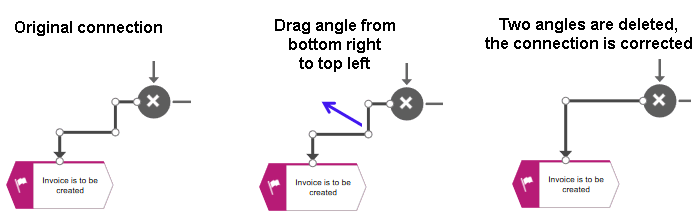
One or more angles will be deleted and the connection alignment will be optimized.
You can have the connection alignment automatically realigned by ARIS.