Report: IT landscape administration - Update and create PSU group structure
This report is run once for a database of the previous version and moves all existing process support units (PSUs) into the group structure required for privilege management.
Run this report only if you have created the process support map with the previous version and want to migrate the data now.
Using this stucture as well as the reports IT landscape administration - Assign access privileges and IT landscape administration - Assign administration access privileges you can manage access privileges for process support units.
The group structure is inserted below any chosen group. If necessary, you can define this group on the Administration tab in the configuration file <ARIS server>/Evaluations/Common files/psmReportConfig.xml. If no group has been defined there, the main group is automatically used. The following group structure is created for each process support unit:
Group named after the object type in the column header
in this example: Function
Group named after the column header
in this example: Send contract documents to supervisor
Group named after the object type in the row header
in this example: Organizational unit.
Group named after the row header
in this example: Production UMG America.
The process support unit is moved to this group. The privileges of the original PSU group are applied to the new group, that is, the access privileges of the process support unit remain unchanged after report execution.
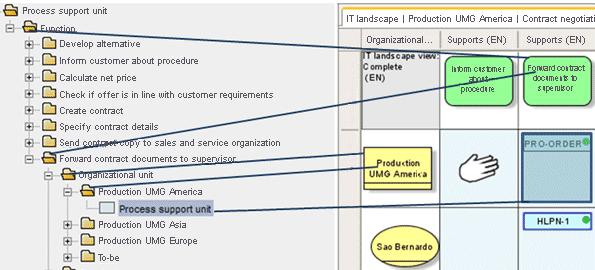
The figure shows the database-wide movement of process support units to the Process support unit subgroup.
The process support unit highlighted in the process support map is moved to the following subgroup:
Function > Send contract documents to supervisor > Production UMG America.