Object definitions and SAP shadow functions
The symbols shown are used if you are not using a user-defined method configuration. If you have customized the method configuration for using BPMN, please find out how SAP shadow functions that deviate from the default behavior.
SAP® items are identified by the SAP ID attribute. The SAP ID is unique in SAP® Solution Manager. It is automatically specified during synchronization of data in ARIS Designer. If you create a definition copy of a synchronized SAP function with assistance, all synchronization-relevant SAP attributes, such as the SAP ID, are automatically deleted from the copy. If you create a definition copy of a synchronized SAP function without deleting these SAP attributes, synchronization would no longer be possible. This is because the SAP ID would no longer be unique and the object to be synchronized can no longer be determined. Definition copies of previously synchronized items must not be used.
Therefore, in SAP® process models with a specified SAP ID, SAP functions with an identical SAP ID must occur only once. You can recognize these SAP functions by this symbol if you have not changed the method configuration:
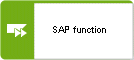
If you are using occurrence copies of SAP functions, they are displayed with the SAP shadow function symbol by default:
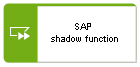
The SAP shadow function symbol excludes the object from the synchronization process. This also affects related Process interface symbols used in process models.